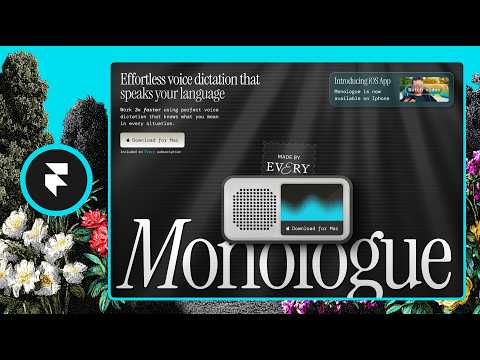
How We Designed Monologue's Landing Page With Framer
A walkthrough of how Monologue's landing page was designed using Framer.
# Channel Presentation Observations: "How We Designed Monologue's Landing Page With Framer"
## Observable Identity of the Presenter(s)
- **Named presenters with stated roles:** The video opens with a self-introduction: *"my name is Lucas Crespo, I'm the creative director here at Every and this is Daniel, our super talented design star here at Every as well."*
- **Team-based presentation format:** This is a two-person conversational walkthrough, not a solo tutorial — Lucas interviews/guides while Daniel demonstrates the build in Framer.
## Creator Claims About the Organization
- **Affiliation with "Every":** Both presenters explicitly claim to work at Every, describing Monologue as *"one of our products here at Every."*
- **Claimed product portfolio:** The presenters claim a family of products, referencing *"our spiral app... our Spark app or Cora even."*
- **Claimed product category:** Monologue is described as *"an AI detection tool, basically a competitor to Whisper Flow and other AI dictation tools."*
- **Claimed role of the channel content:** The video is framed as internal-expertise sharing: *"we'll take you guys through the entire project so you can see how it looks like when a creative director and designer work together."*
## Claimed Scope of the Content
- **End-to-end design process walkthrough:** The stated scope covers the full landing page: hero section, feature animations, textures, footer, CTAs, and responsive breakpoints.
- **Design philosophy as content theme:** A recurring claim is deliberate differentiation — *"we really wanted to go dark mode when the rest of our competitors are going light mode, we really wanted to go more skeuomorphic when they're going more minimalist, we wanted to be more loud."*
## Demonstrated Presentation Patterns
- **Tool-centric content:** The walkthrough is organized around **Framer** capabilities (canvas layering, breakpoints, components, shader integration via Framer's workshop), with side mentions of **Figma, Rive, and an in-house tool called "paper"** for shaders.
- **Design-craft audience signal:** The content presumes familiarity with design tooling concepts — vectors vs. PNGs, inner shadows, Lottie vs. Rive interactivity, breakpoints — indicating an audience of designers/creators rather than general consumers.
- **Casual, conversational tone:** Frequent informal phrasing (*"I think it's pretty sick"*, *"Hey, you can always make it more realistic, right?"*) demonstrates an unscripted, peer-to-peer style.
- **External validation cited:** Recognition is claimed and presented as evidence of quality: the site *"has appeared in Mobbin as like a design reference"* and was *"promoted in the sites like a movie and even land book."*
## Intended Audience (Observed)
- **Designers and creative professionals**, based on:
- Deep dive into craft decisions (noise textures, shadows, light rays, speaker grille vectors).
- Workflow discussion (Figma → Framer translation, *"moving away from Figma the closer we are to launching"*).
- A direct endorsement aimed at practitioners: *"You just have to watch like 2-minute video on... YouTube and that'll be it. You'll be all set."*
- **Potentially also Framer users/adopters**, given the consistently positive framing of the tool: *"Combining components, shaders, and animations in Framer, anything is possible in my opinion."*
## Demonstrated Self-Description Evidence
- A claimed **company-wide design signature**: *"that's basically one of the main recurring things that we use through all of our Framer sites for all the landing pages of all our products... our little signature that we use as a company to let our users know who's behind each one of our products."*
- A claim about the channel's own standard: *"this is probably one of the most polished sites that we have ever launched like from every"* — suggesting the team benchmarks itself against past work (*"we're always trying to beat our own bar"*).
- A causal claim linking design to outcomes: *"you can just get traffic from having like a beautiful experience."*
## Claims vs. Demonstrated — Distinction Notes
- **Claims (creator-stated):** Every affiliation, product lineup, competitive positioning, external recognition (Mobbin, Land-book), and the "signature stamp" practice.
- **Demonstrated (observable in this video):** Collaborative director/designer format, casual tone, tool-specific technical depth, and an audience presumed to be design-literate.
- No private motivations beyond stated goals (*"how do we make this cool?"*) were inferred; all observations above trace directly to transcript statements.
# Delivery Observation: "How We Designed Monologue's Landing Page With Framer"
## Overview
A two-person conversational walkthrough led by **Lucas Crespo** (creative director, primary host) with **Daniel** (designer) alternating in focused segments. Delivery is casual, enthusiastic, and improvisational rather than scripted.
---
## Tone
- **Casual and warm**: Opens with "Hey guys, my name is Lucas Crespo" and complimentary framing — "Daniel, our super talented design star."
- **High, sustained enthusiasm**: Repeated intensifiers like "really really excited about," "extremely extremely skeuomorphic," "pretty sick," "super worth talking about."
- **Mutual affirmation**: Both speakers validate each other — "Yeah, definitely," "Nice. Nice," "Yeah, exactly."
## Vocabulary & Recurring Phrases
- **"Kind of like"** as a constant verbal filler (Lucas especially):
- "that kind of like translates itself to the brand"
- "the bandwidth just kind of like disappears"
- **"Basically"** repeated by both:
- "Monolog is... basically a competitor to Whisper Flow"
- "So, basically the intention here."
- **"Really" doubled for emphasis**: "really really wanted to accomplish two things," "really really make it clear."
- **Design jargon used naturally**: *skeuomorphic, breakpoints, shaders, Lottie, Rive animation, above the fold, Easter eggs, inner shadows, textures, noise.*
- **Metaphoric/figurative language** (mostly Lucas):
- "the madness behind the method" (reversing the usual idiom)
- "Monolog is a completely different animal... completely different beast"
- "it can look like a spider web"
- "brings it full circle"
## Teaching Habits
- **Numbered framing**: "we really really really wanted to accomplish two things. Number one..."
- **Contrast-based explanation**: "we really wanted to go dark mode when the rest of our competitors are going light mode... more skeuomorphic when they're going more minimalist... more loud when they're going quieter."
- **Part-by-part structure**, announced explicitly: "maybe we can go part by part of the site."
- **Question handoffs**: Lucas directs segments to Daniel — "Daniel, is just maybe we can go part by part," "how how do we even make—", "are those currently PNGs or are those actual vectors?"
- **Performance/bandwidth pragmatism**: Explains optimization reasoning — "how can we optimize this? How can we make this run better and be less expensive."
## Communication Patterns
- **Speaker alternation via turns**, marked in transcript with `>>`, typically Lucas framing intent, Daniel explaining execution:
- Lucas: "we wanted to do it this way" → Daniel: "The way we did it is..."
- **Self-corrections and false starts**, suggesting unscripted delivery:
- "it I I I translated pixel by pixel"
- "to to to to beat our own bar"
- **Enthusiastic repetition for emphasis** rather than precision: "the main main main thing."
- **Casual sign-off**: "I really appreciate you and I'll see you later in Slack." / "See you, man."
## Stable vs. Isolated
- **Stable patterns** (frequent repetition): "kind of like," "basically," doubled "really," casual interjections ("you know?", "etc., etc."), enthusiasm markers.
- **Isolated moments** (insufficient evidence of habit): Daniel's "I'm super fast at Framer," the throat-clearing noted at ~[461], and Lucas's idiom slip "madness behind the method" — single occurrences, so no pattern claim is made.
## Uncertainty Notes
- Speaker attribution between Lucas and Daniel is sometimes ambiguous where transcript markers are sparse; the Lucas/Daniel split above follows the `>>` cues and self-references ("I'm the creative director," "I did it on Figma").
- Verbal fillers were counted from visible transcript text only; exact frequency cannot be fully verified without audio.
# Observation Record: How We Designed Monologue's Landing Page With Framer
## Speakers
- **Lucas Crespo** — Creative Director at Every (self-identified)
- **Daniel** — Designer at Every (introduced by Lucas)
## Context & Product
- **Monolog** is an Every product described by Lucas as an "AI detection tool" and "a competitor to Whisper Flow and other AI dictation tools."
- The video walks through how the landing page was built in **Framer**.
## Stated Design Goals
- **Lucas:** Two main goals for the page:
1. "Tell the hell out of the story of Monolog and who is it for."
2. Differentiate from competitors' minimalist landing pages — dark mode vs. their light mode, skeuomorphic vs. minimalist, "loud" vs. quiet.
- **Daniel:** The hero section was intended to "make a great first impression" since Monolog was launching as a new app.
- **Daniel:** A stated goal was "how do we make this cool" — Framer was chosen as the tool for that.
## Process & Tooling Claims
- **Daniel:** Initially designed in Figma, then translated "pixel by pixel" into Framer, with added animations.
- **Lucas:** Framer's canvas let the team "move away from Figma the closer we are to launching" and iterate faster; rapid team feedback.
- **Paper shader optimization (both speakers):**
- **Daniel:** Shader animations built in their app "Paper" can be exported via Framer's workshop; less bandwidth used.
- **Lucas:** Originally exported shader animations as videos; increased traffic made the site more expensive, so they switched to actual shaders — which he believes are "just like React code, basically" (tentative: "I think") — eliminating video media and bandwidth costs.
- **Rive animation:**
- **Daniel:** A Rive animation by **Valerio** (praised by Lucas as "one of the best animators in the game") explains the three dictionary features.
- **Lucas:** Rive was chosen because interactivity was needed — not achievable with MP4 or Lottie alone.
- **Daniel:** The animation was rebuilt per breakpoint to suit each screen size, with an auto-rotating loading indicator.
- **iOS section:** Daniel said the site originally covered only the macOS app; once the iOS app shipped, Framer made it easy to add a promotional section quickly.
- **Vector detail:** Asked whether speaker-hole circles were PNGs or vectors, **Daniel** confirmed **actual vectors**, built by copying from the product and using inner/layered shadows.
## Design Philosophy & Recurring Elements
- **Lucas:** Brand and product are "extremely linked and almost one in the same"; the site should feel like the physical, skeuomorphic app.
- **Daniel:** Achieved realism through full-page **textures and noise overlay** — "you can touch it" — fitting since Monolog involves voice recorders ("physical devices on a digital world").
- **Lucas:** Every's recurring **stamp component** appears across landing pages (Spiral, Spark, Cora) as a company signature identifying who's behind each product.
- **Lucas:** The footer was treated as a **final CTA** with big typography and a bright "download for Mac" button, rather than a link-heavy sitemap — creating a continuous experience from the hero.
- **Lucas:** Main CTAs are buttons embedded in the device mockup, giving users "a sneak peek" of pressing the actual product.
- **Lucas:** The page contains small **Easter eggs**; **Daniel** noted Framer makes hover/light effects easy to add.
## Self-Assessment & Reception Claims
- **Daniel:** Favorites: the "above the fold" notes/speaker section (new feature; he built it last, admits possible bias: "I don't know if it's because I'm biased"), and the hero, which he says was promoted on sites "like a movie" and "land book."
- **Lucas:** Claims the site appeared on **Mobbin** as a design reference and in taste/design publications, arguing "designing with difference" drove traffic.
- **Lucas:** Calls it "one of the most polished sites we have ever launched" from Every, while noting they always try to beat their own bar.
- **Daniel:** "Combining components, shaders, and animations in Framer, anything is possible in my opinion. And I'm super fast at Framer." (Opinion, stated as such.)
- **Lucas:** Closing point — you don't have to make a traditional, easy website; Framer lets you "be a little bit more ambitious."
## Qualifications Preserved
- Lucas's "I think it's just like React code, basically" — tentative characterization of shaders.
- Daniel's acknowledged bias about his favorite section.
- Daniel's "anything is possible" framed explicitly as opinion.
# Speaker Attribution & Provenance Record
## Video
- **Title:** How We Designed Monologue's Landing Page With Framer
- **ID:** `01a0f15a-8820-7ca5-9d28-9aeb2f5c696a`
## Identified Speakers & Roles
| Speaker | Role | Evidence |
|---|---|---|
| **Lucas Crespo** | **Creator / Host** — Creative Director at Every | Self-introduction: *"my name is Lucas Crespo, I'm the creative director here at Every"* |
| **Daniel** (no surname given) | **Guest / Co-presenter** — Designer at Every | Introduced by Lucas: *"this is Daniel, our super talented design star here at Every"* |
| **Valerio** (not present) | **Third-party contributor** — animator credited with the Rive animation | Cited by speakers: *"one of the best animators in the game right now"* (this is a speaker characterization, not verified fact) |
No narrator or other roles identified. No curated metadata was supplied with this transcript.
## Referenced Products, Tools & Sources
- **Every** — publisher/company employing both speakers; owner of Monolog
- **Monolog** ("Monologue") — Every's AI dictation product; subject of the video
- **Competitor named:** **Whisper Flow** (explicitly); other dictation tools deliberately unnamed
- **Other Every products referenced:** Spiral, Spark, Cora
- **Tools cited:** Framer (site builder), Figma (initial design), Paper (shader app), Rive (interactive animation), React (shader export described as "basically React code"), MP4/Lottie (mentioned as rejected alternatives)
- **External sites cited:** Mobbin, "land book" (uncertain transcription of a site name), YouTube (2-minute tutorials), unspecified "taste or design publications"
## Promotional Segments
- **Promotional content flagged:** This video functions partly as promotion for **Monolog** (Every's product), including explicit **download CTAs** ("download for Mac" button) and an in-video promotion of the **iOS app launch** — the speakers state they added a banner "to promote real quick the iOS app."
- Positive framing of **Framer** throughout; the video is effectively a Framer workflow showcase.
## Provenance Notes & Uncertainties
- Attribution of lines between Lucas and Daniel relies on the `>>` turn markers; some speaker switches are ambiguous and attribution is best-effort.
- "Molo" and "Mola" appear in the transcript as likely mis-transcriptions of **Monolog**.
- Third-party claim: Valerio's status as a top animator is a **speaker opinion**, unverified.
- Traffic and design-publication claims about the site are speaker statements only.
- **Comment availability:** Not indicated — no metadata supplied.
Hey guys, my name is Lucas Crespo, I'm the creative director here at Every and this is Daniel, our super talented design star here at Every as well. We want to talk to you so much about how we
made the landing page for Monolog in Framer. Monolog is one of our products here at Every. It's an AI detection tool, basically a competitor to Whisper Flow and other AI dictation tools that will remain nameless. From the very beginning, we really leaned into visual impact when creating \[music\] this brand and product. Everything we have done has come within the idea that we really wanted it to \[music\] differentiate itself as much as possible. And so, that kind of like translates itself to the brand and the choices we made and web design, the product and \>\> \[music\] \>\> and everything really. And we'll take you guys through the entire project so you can see how it looks like when a creative director and designer work together to create something that we get really really excited about. Um I hope you like it. Just want to kind of like share you how we build this entire site in Framer. And first first of all, like as you can see, we're greeted by this awesome very dynamic hero section that has embedded in the middle of it our Monophone, which is basically the our star. It's basically the the very main character of the entire Monolog app at least on macOS. And we basically wanted to create something like extremely extremely skeuomorphic and kind of like showcasing it at the very very top of the page makes it really clear like who we are designing this for more than anything. So, when we really wanted to create this page, we really really really wanted to accomplish two things. Number one of and
the most obvious one is be able to tell the hell out of the story of Monolog and who is it for and all that sort of stuff. But the second goal and the main reason why we made it the way that it
looks is because we really wanted to do differentiate it from the rest of the minimalist approaches that other people take when they make uh landing page. So, um we really wanted to go uh dark mode when the rest of our competitors are going light mode, we really wanted to go more skeuomorphic when they're going more minimalist, we wanted to be more loud when they're going like quieter. I think all of that kind of like goes to show the type of page that we have here in front of us right now. Framer really allowed us to iterate extremely quickly and have the team kind of like reacting quickly and giving feedback quickly and all that sort of stuff. So, I think maybe what we can do now, Daniel, is just maybe we can go uh part by part of the site and maybe we can talk briefly really quick about the about the hero section and why it looks the way it looks right now. \>\> Yeah, definitely. For the hero section especially, we wanted to make an impact knowing this was the like a launch uh for this app. So, Molo didn't exist before and we wanted to make a great first impression. So, basically that was the intention here. Um initially I did it on Figma, but the good thing about Framer is that I it I I I translated pixel by pixel just as it is and even better because I can add animations and on top of it. The intention here, uh Lucas, was uh actually meant for create a great a
first impression here. So, using the assets that we already built on the product, uh we incorporated here Framer really easily. We actually have the wave. We even have
some light light rays effects on the top. \>\> If you zoom out, you can get you guys can see basically like the the madness behind the method and all the the layers and everything that goes into making something like this as well as all the the animations, etc., etc. and you can see like all the connectors and it can look like a spider web to to some but it really kind of like goes to show that like the the canvas kind of like really lets us, you know, move away from Figma the closer we are to launching and just kind of like start, you know, moving faster through through the design the page. Another interesting thing that I wanted to kind of like point out. This is one of those things that um we've been trying to start doing in a lot of our different apps. So, if you go to our spiral app or if you go to like our Spark app or Cora even, you're going to notice this little stamp in the landing page, right? And and that's basically one of the main recurring things that we use through all of our Framer sites for all the the landing pages of all of our products. It's like one of those components that we reuse over and over again. It's kind of like our little signature that that we use as a company to let our users know who's behind each one of our products. I think something really interesting to hear that I think it's super worth talking about is our paper shader animation. Like how how do
we even make \>\> Yeah, this paper shader animation was made on using one of the shaders that we have built
on paper, this app that we have over here. You can actually export this and translate it pretty easy using the workshop of Framer. So, the good thing is that you don't you're not using a ton of bandwidth on your account and it will translate it really easy on the actual website. \>\> We originally created this in paper but then like we recorded them, exported them as videos and then like the more traffic that the page got, like basically the more expensive our website got because we started getting like a lot of traffic so we started like thinking, you know, like how maybe a lot of engineers think which is like how can we optimize this? How can we make this run better and be less expensive, etc. So, just using the actual paper shaders, which I think it's just like React code, basically, I think. It It's just like video is no longer a thing. There's no media consumption, and the bandwidth just kind of like disappears really there and makes it really easier for us to kind of like continue working here. This section was really interesting because we had to work with Valerio, which is one of the best animators in the game right now for anybody looking for sick motion design. Valerio basically made this Rive animation here that helps tell a little bit more of the story around Monolog. \>\> We have this animation that basically explains all the three features that are included
on the dictionary thing in the Monolog. And basically, the best way to do it is just create a Rive animation. \>\> Yeah. I think it's basically we wanted to use
Rive because we needed the animation to be interactive, right? So, we couldn't do that with an MP4 or with a Lottie file in and of itself. So, Valerio really helped us do it this way. And then, I wanted to I think it'd be a good idea to showcase how how it how responsive this is, right? \>\> Yeah, different breakpoints. And the idea is that you have it changing depending of the breakpoint you're in. And on I think great our model should look like like this. \>\> We are able to just kind of like have the same animation, but completely constructed for different breakpoints, and just kind of like have it adapted that way in a way that like looks a little bit uh um more specific to the actual intention of of the screen size in and of itself. And it has like a nice \[clears throat\] little loading indicator that auto rotates between each section and and each other, which I think it's pretty sick. Um I think something uh really cool also about this page in general are all the textures and all the shadows and all the depth that we kind of like if you keep scrolling down for example. Yeah, like Let let maybe let's talk a little bit about like how do we get the feeling of the app into the website because the app obviously it's like this very skeuomorphic thing that feels very physical that feels like you can touch it that has like depth and volume to it. And obviously like we wanted the website to feel very connected to it cuz we really think uh product and brand are sort of like extremely linked and almost
like one in the same. \>\> The way we did it is well, we know we know that Mola has like physical devices on a digital world. So, the way we make
this to look like a little more real is just by adding textures and make it more skeuomorphic. The the more we can, the better. So, basically um what we did here I have like a sh- like a texture all over the whole page. And basically add some noise through the whole page. I have like this noise on top of all the website. So, basically this is all over the place. And this gives this I don't know, like you can even you can touch it, you know, that that's the feeling that we're we're looking for. And because we have like this recorders voice recorders and it makes sense in the whole branding to have uh this type of you know, texture and depth on everything we do. \>\> I'm also super excited about how the footer looks like just because I think like um a lot of people usually use the footer maybe just as a like a like a site map type of thing, right? Like a lot of people like front load their their footer with a bunch of links, a bunch of stuff to kind of like help you navigate, but for us it was more like a like a final CTA, right? Like for us we wanted to kind of like really really make it clear that like Monolog is in a completely different animal, it's going to completely different beast, and with having just like a really big the really big typography, the really big device in the middle with the with the wave and just like the really really bright download for Mac button right there. I think like it just kind of like
connects it and brings it full circle from the very top at the beginning of the site. So it has like a very type of continual type of experience, I would say. And uh
and I think like even the coolest part to me, and maybe we can Oh, yeah, yeah, yeah. Like the page is just full of like tiny Easter eggs, right? \>\> That's a good thing about a framework that you can add over effects, light effects on you know, little things. Uh even adding just animations on all over the the whole site is really really easy. \>\> Yeah. \>\> You just have to watch like 2-minute video on on on on YouTube and that'll be it. You'll be all set. \>\> Nice. Nice. I think I think also what's really different and and interesting is that our main CTAs for download for Mac are not like a normal button, but it's like a button in the device. It's like it's actually as if you were pressing the actual product that you're going to be able to use. So it's kind of like giving users like a little bit of a sneak peek or a little bit of a taste of like what they're going to what they're going to get, you know? And that's like the actual product. \>\> I think my my favorite part is actually the above the fold, and this section about the notes, which is actually the the new feature we launch. Uh and I don't know. Basically, I love this speaker that I did here. And you know, it's so simple just to add like share shadows and and the light effects. So, it actually feels like this is part of the product somehow. I like this. I don't know if it's because I'm biased because I just did it. It was the last section I I I built.
But actually, I love the the bow the hero section a lot because it creates the good impression as I said before. And you know, it was even promoted in
the sites like a movie and even land book and these other websites. \>\> I think also the other cool thing to to mention obviously is that like this whole site was made for uh, when we launched the Mac OS app. But then obviously, very rapidly our team uh, shipped the iOS app. So, we wanted to be able to kind of like create its own section and its own like little banner to kind of like connect it. \>\> Initially, we had only the Mac OS app as Lucas said. And uh, we found into a problem where the good thing is that we were doing this all in Framer. So, it was really easy just to add this little Easter eggs just to promote real quick uh, the iOS app on top of it. \>\> Quick question about this uh, this section of the the iOS section. The little holes or circles that are that are part of the like the speakers, let's say. Um, are those currently PNGs or are those actual vectors? \>\> Actual vectors. The good thing is this I built it on the product. So, it was just so simple just to copy what I did. So, I added some inner shadows. And actually, you get even in make it even more realistic with adding another shadow up to it. And you know, \>\> Hey, you can always make it more realistic, right? \>\> Yeah, yeah. Always. There's always a way to make it even better. So, yeah. Uh I was just following that and that's the same way I
did the ones on the product. So. \>\> Yeah, exactly. Like the product, the site, everything is sort of like one in the same. And I think like that's kind of like the coolest part of it that you don't really have to make, let's say,
like a super traditional website that's easy, you know? You can like really do something hard, which I think it's like the the cool thing about Framer that you can like try to be a little bit more ambitious and and you know, play have a little bit more fun with how things look, etc., you know? \>\> Combining components, shaders, and animations in Framer, anything is possible in my opinion. And I'm super fast at Framer. \>\> I think like to to be honest, I think like this is probably one of the most polished sites that we have ever launched like from every. Obviously, like we're always trying to to to to beat our own bar that we set for ourselves, but the fact that like this site has appeared in in Mobbin as like a like a design reference and the website starts appearing in like different like taste or design publications or whatever just really goes to show how like designing with difference as being like the main main main thing that we want to achieve like really goes to show how like you can just get traffic from having like a beautiful experience, you know? \>\> Yeah, yeah. Yeah, that that was even the intention. I remember like, "Hey, we want to make this look super cool." I remember speaking to you. \>\> Yeah. \>\> And that was one of the goals like, "Hey, how do we make this cool?" So, I think Framer was like our go to go to for this. So, yeah. I \>\> Awesome. Well, Daniel, thank you so much for sharing for a second. I really appreciate you and I'll see you later in Slack. \>\> See you, man.